Gong + Salesforce Integration: Playbook for Clean Data, Lower Risk, and Real Adoption
If you’re integrating Gong with Salesforce, don’t start with the connector. Start with strategy. Here’s how RevOps teams prevent bad data, control storage costs, and sync only what drives action.
Simply Scale Team
February 10, 2026
Read Time: 10 Minutes
Gong + Salesforce: The Strategy Most Teams Skip (And Why It Matters)
If your tech company is doing $3M+ in revenue, there’s a good chance you have a sales team. And if you have a sales team, you’re probably looking for ways to improve sales calls and close more business.
That’s why Gong + Salesforce is such a common integration.
The setup is easy. The documentation is everywhere. Most teams can connect the two systems quickly.
The problem is: teams often skip the strategic part, why they’re doing it, what they want from it, and how they’ll prevent it from turning Salesforce into a dumping ground for call data.
Done right, Gong to Salesforce can create real leverage: better coaching, better pipeline visibility, and better decisions.
Done wrong, it creates the exact opposite: more bad data, higher costs, slower systems, and less trust in reporting.
This post lays out a RevOps-first way to integrate Gong with Salesforce so you get signal, not noise.
Start Here: Why Are You Integrating Gong with Salesforce?
Before anyone touches the technical integration, align leadership on one thing:
What is the goal?
Because if the goal is fuzzy, the default behavior is predictable:
turn everything on
sync everything
deal with the fallout later
Instead, define the “why” up front, especially because different groups often assume different reasons:
Ops assumes: “Leadership wants better reporting.”
Sales reps assume: “This is performance monitoring.”
Sales managers assume: “We want better coaching and deal inspection.”
Leadership assumes: “We want deals to close faster.”
If those aren’t aligned, the integration will produce data, but not outcomes.
Good, grounded goals for Gong + Salesforce
These tend to work well:
Help reps get better (coaching with real call evidence)
Identify risky deals early (patterns that predict slips)
Understand why deals close or don’t close (beyond a generic close-lost reason)
Give leaders real visibility into what’s actually being said
A risky “goal” that backfires
“Let’s sync everything and see what we can do with it.”
That approach usually leads to: more noise, higher cost, and a CRM no one trusts.
The 4 Questions You Should Ask Before You Connect Anything
If you’re in the leadership meeting, or you’re the person who owns Salesforce, these questions prevent a lot of pain later:
Why are we doing this? What outcome do we want in 30 to 90 days?
What will change in the business after the integration? What will managers do differently? What will reps do differently?
What could go wrong if we integrate today with default settings? Think: data bloat, duplicates, reporting noise, adoption issues.
What’s the ultimate cost? Not just licenses, Salesforce storage, admin time, cleanup projects, and “surprise” downstream work.
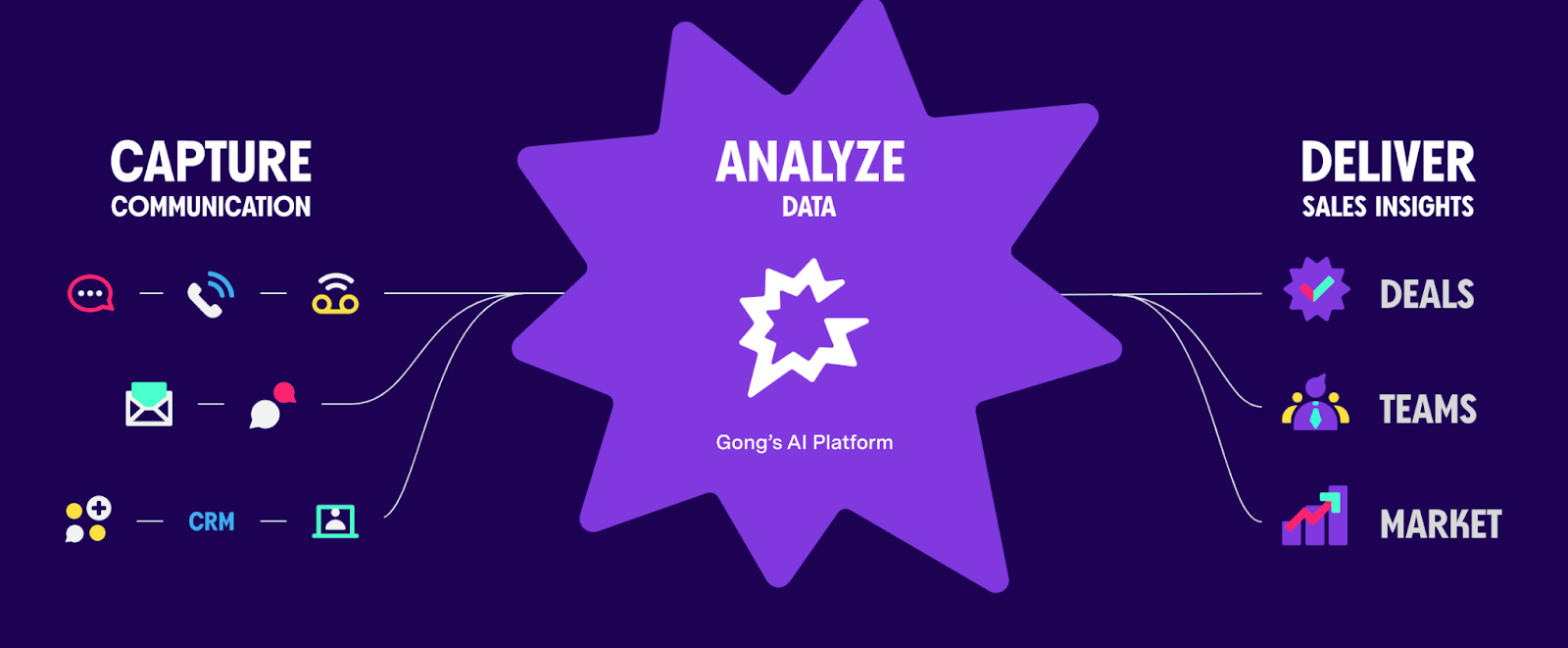
What Actually Changes After Gong + Salesforce Are Connected
Once the systems start talking, you’ll see:
Call recordings and meeting details showing up in Salesforce
More activity data attached to records
More fields populated
More objects storing “stuff” that has to live somewhere
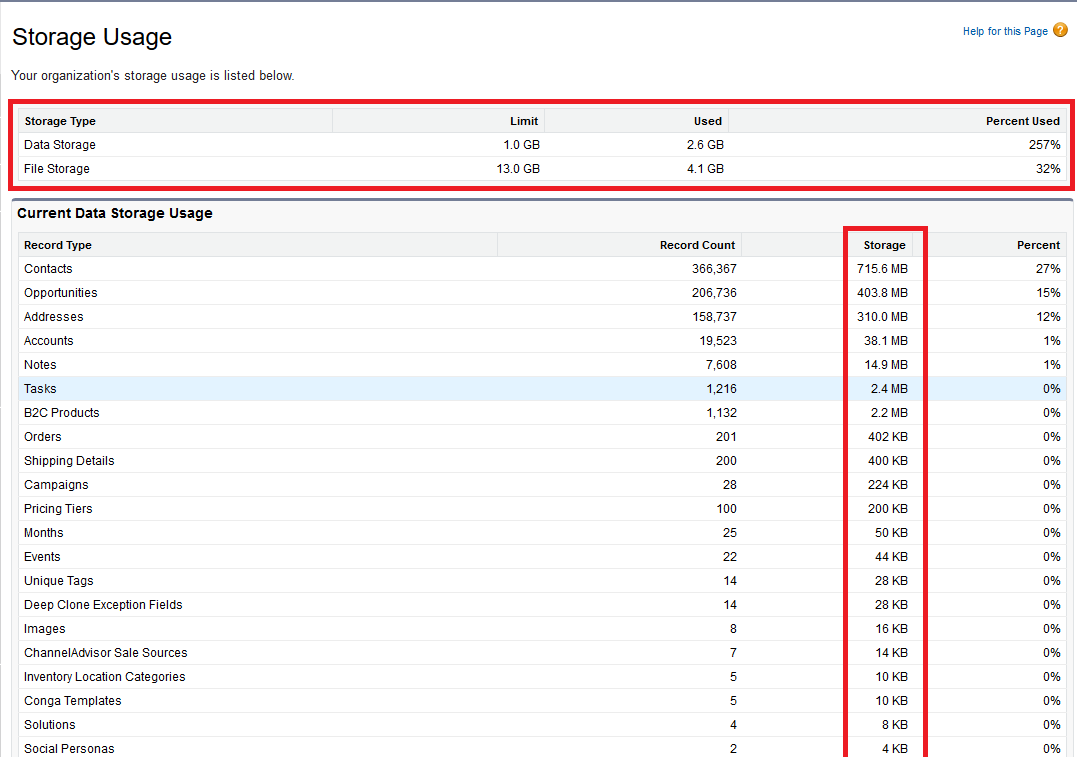
And that “somewhere” is usually Salesforce storage.
This is where teams get surprised:
They sync everything
Six months later storage becomes a problem
Now they’re forced into expensive options:
buy more Salesforce storage, or
export to a data lake (Snowflake, etc.), integrate that back, and support it long-term
Either path costs time and money. The difference is whether you planned for it, or got put in a pinch.
The Most Common Mistake: Turning Everything On
If you don’t define what matters, the default is:
Sync everything.
And that often creates four problems:
1) Too much data equals overwhelm
Reps and managers stop looking because it’s noisy.
2) Higher costs (and they creep up)
Storage grows quietly until it becomes urgent.
3) Slower systems
More data can create performance headaches.
4) Reporting becomes less trusted
If the data is duplicative or not actionable, dashboards get questioned, and decision-making slows down.
And slow decision-making is one of the most common (and least obvious) blockers to scaling.
“More Data” Isn’t the Same as “Better Data”
Gong data is valuable, when it’s tied to action.
Salesforce, by design, should be where your team takes next steps:
pipeline movement
follow-ups
tasks
stage progression
coaching workflows
reporting that drives decisions
If it’s data you’ll mostly reference for historical analysis later, that’s where a data lake can be a better home.
A useful mental model:
Salesforce holds the signal. Gong holds the detail. And long-term history can live elsewhere if storage cost matters.
A Better Plan: How Strong Teams Integrate Gong + Salesforce
Here’s the approach that reduces risk and increases adoption:
1) Decide what Salesforce is for
If you’re not sure, the safest default is:
Salesforce equals actionable data. If it drives a workflow, a report, a dashboard, or a metric someone owns, keep it.
2) Decide what stays in Gong
Not everything needs to be mirrored in Salesforce.
Ask: Where will the team actually consume this?
Managers coaching in Gong? Keep detail in Gong.
Reps need a quick “what happened” summary in Salesforce? Sync the summary.
Execs want rollups? Push the right fields, not the raw firehose.
3) Sync only what matters
Be intentional about:
which objects
which fields
which call types
which stages
which users or teams
4) Set rules before you turn it on
This is the part most teams skip, and it’s where ops maturity shows up.
Define:
field definitions
ownership (who maintains what)
what “good data” looks like
what triggers action
how exceptions are handled
Lower-Risk Rollout: Start with a Control Group
Instead of turning it on for everyone on day one:
Pick 1 to 2 reps, or a small team
Turn on your proposed sync rules
Validate:
Is the data accurate?
Is it actionable?
Does it clutter the record?
Does it break reporting?
This protects the business and protects the operator rolling it out.
If something’s off, you fix it quietly, before it becomes a company-wide “this integration is a mess” story.
Align Sales + Ops (and Name an Owner)
Gong is a sales tool. Salesforce is the operational system of record.
That means sales and ops need to be in lockstep on:
what gets synced
what gets ignored
what managers will actually do with the data
who owns ongoing maintenance
A lot of “tool problems” are really people problems:
unclear definitions
no owner
assumptions instead of alignment
One simple fix solves a lot:
Assign a named owner. Not “RevOps.” Not “Sales Ops.” A person.
Final Takeaway
Gong + Salesforce can be a high-leverage integration. But the teams that win with it aren’t the teams that “sync everything.”
Good implementations have:
A clear goal
A defined scope (what not to sync is the differentiator)
Planned costs (especially storage over time)
Rules + ownership before go-live
Because discipline doesn’t scale.
Systems do.
2 Ways We Can Help You
If you’re planning a Gong + Salesforce integration soon and want to avoid the common pitfalls, data bloat, unclear ownership, and storage surprises, we help RevOps teams design this the right way before anything gets turned on.
Join the Simply Scale network and get insider strategies, automation tips, and expert insights straight to your inbox. No fluff—just real solutions to scale faster.

.png)


.png)
