How RevOps Teams Improve Salesforce Data Quality by Eliminating Duplicate Records
A practical guide for RevOps teams on how to clean up duplicate data in Salesforce without breaking reporting, workflows, or revenue operations.
Simply Scale Team
February 10, 2026
Read Time: 10 Minutes
How RevOps Teams Improve Salesforce Data Quality by Eliminating Duplicate Records
For most tech companies doing $3M+ in ARR, Salesforce isn’t just another tool.
It’s the brain of the business.
Sales, marketing, customer success, finance, leadership... everyone depends on Salesforce data to make decisions. And when that data is messy, duplicated, or outdated, the entire company feels it.
The problem? Most teams don’t realize how bad it’s gotten until growth stalls.
Let’s break down why duplicate data in Salesforce is such a big deal, how it impacts every department, and how it can usually be fixed in one hour or less when done correctly.
Salesforce Is the Brain of Your Company
At a certain stage of growth (typically around $3M ARR and beyond) most tech companies run nearly all operational data through Salesforce.
That means:
Pipeline data
Customer health
Revenue forecasting
Support activity
Executive reporting
If Salesforce isn’t accurate, you don’t actually know what’s working or what’s broken.
And if you can’t clearly see the problems, you can’t fix them — let alone scale past your next milestone (whether that’s $25M, $50M, or $100M+).
The Most Common Problem We See: Duplicate Data
When we first start working with new clients at Simply Scale, duplicate records are almost always present.
These duplicates don’t just “look messy.” They actively cost you time, money, and growth.
How Duplicates Hurt Sales Teams
Multiple reps chase the same lead
Legitimate opportunities get ignored
Follow-ups happen too late (or not at all)
Six-figure deals are lost to faster competitors
In many cases, sales reps are wasting 40–50% of their time working bad data.
How Duplicates Hurt Customer Support & Success
Reps call outdated phone numbers or emails
Customers feel ignored or frustrated
Delayed responses damage trust
Churn risk quietly increases
Customer Success Managers can’t “show the love” when they don’t know which record is real.
The Downstream Effect: Messy Operations = Declining Business
Duplicate data doesn’t stop with sales or support.
It impacts every department:
Marketing sends campaigns to the wrong contacts
Finance forecasts revenue incorrectly
Leadership makes decisions based on flawed KPIs
Operations can’t pinpoint bottlenecks
A messy Salesforce leads to messy operations.
And messy operations lead to stalled growth.
If you’re stuck at a certain revenue rung, this is often one of the silent reasons why.
Why This Problem Keeps You Stuck
For tech companies around $3M+ ARR, duplicate data creates a dangerous loop:
Reps chase the same leads twice
Real accounts get ignored
Clients feel neglected
Revenue leaks out through churn and missed deals
Reporting becomes unreliable
Growth stalls
Until Salesforce is cleaned up and stabilized, scaling becomes guesswork.
The Good News: This Is Usually Fixable in About an Hour
This isn’t a massive, months-long Salesforce overhaul.
In most cases, once the problem is clearly defined, duplicate data cleanup can be handled quickly.
Here’s how the process typically works.
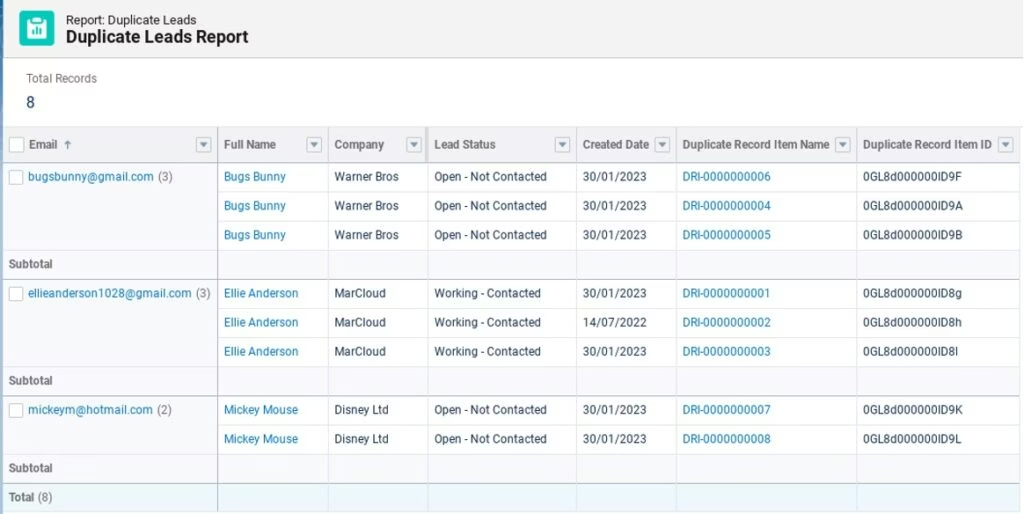
Step 1: Run a Duplicate Report
We start by identifying where duplicates exist:
Accounts
Contacts
Leads
Duplicates are usually identified by:
Matching names
Matching emails
Matching phone numbers
This gives immediate visibility into how widespread the issue really is.
Step 2: Set Matching & Duplicate Rules
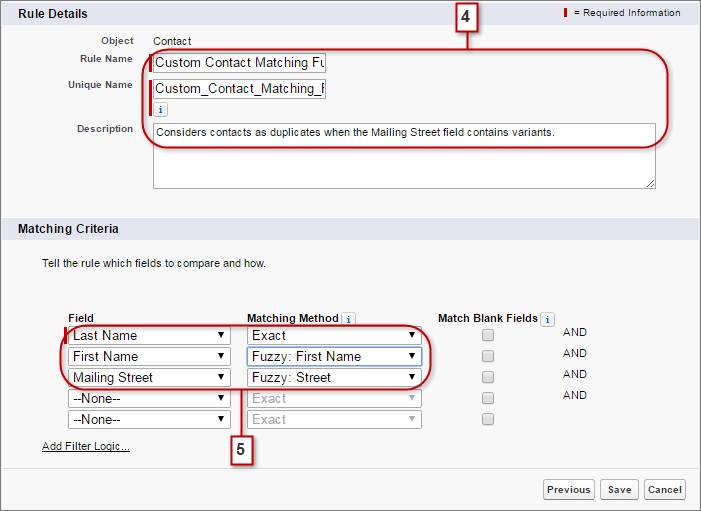
Next, we create Salesforce matching rules and duplicate rules.
These rules define what Salesforce considers a duplicate moving forward, such as:
Same email = duplicate
Same company name + phone number = duplicate
Once these are in place, Salesforce can:
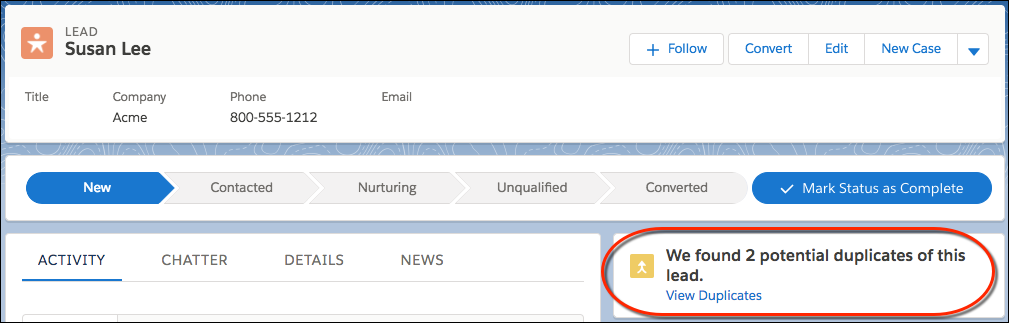
Warn users
Block new duplicate records
Protect data quality automatically
This prevents the problem from coming back.
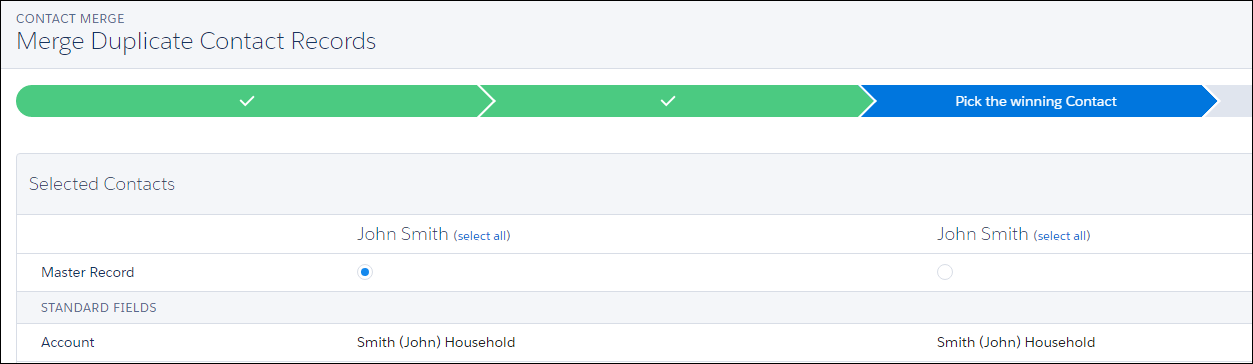
Step 3: Merge and Clean Existing Records
After identifying duplicates, we:
Merge records correctly
Preserve important activity history
Remove junk or outdated data
Confirm with sales or CS teams which records are “source of truth”
This step ensures everyone is working from one clean, accurate record per account.
The Result: A Stable, Scalable Salesforce
Once duplicates are removed and prevention rules are in place:
Sales reps close deals faster
Customer Success increases lifetime value
KPIs become reliable again
Leadership gains real visibility
The business stabilizes and can scale confidently
You stop guessing and start operating with clarity.
How You Actually Win From This
When Salesforce data is clean:
Sales teams stop tripping over each other
Customers feel supported, not ignored
Problems surface early (before they get expensive)
Decisions are backed by real numbers, not assumptions
And yes, if you really want to... there’s probably enough saved revenue to justify a much better office pizza party 🍕
Final Thoughts
If you’re a tech company at or near $3M ARR, duplicate data in Salesforce isn’t just an annoyance... it’s a growth limiter.
The good news? You don’t need a massive rebuild to fix it.
With the right approach, this can usually be handled in under an hour, and fully implemented within 30 days or less.
If you’re stuck at your current revenue rung and can’t quite see why, Salesforce data hygiene is one of the first places you should look.
Join the Simply Scale network and get insider strategies, automation tips, and expert insights straight to your inbox. No fluff—just real solutions to scale faster.

.png)
.png)
