RevOps
Salesforce dropped 200+ release notes. Here's 3 that matter
Summer 26 release is here. Here's what you need to know if you're in RevOps

May 22, 2026
.png)
Read Time: 3 minutes
Salesforce Summer '26 is here.
200+ release notes.
I read all of them so you don't have to.
If you run RevOps, here’s 3 I’d pay attention to:
👇
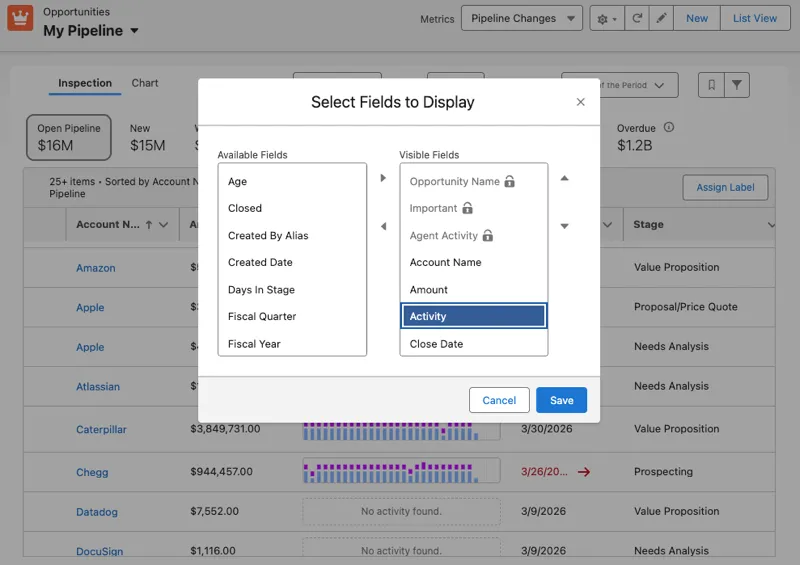
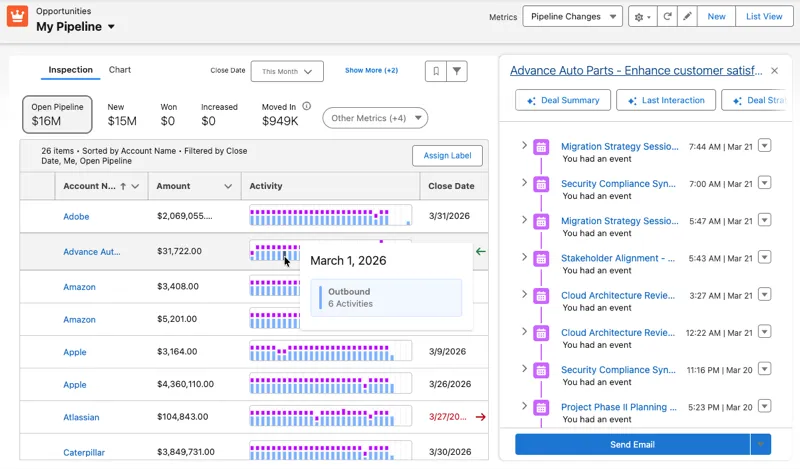
(photo source: salesforceben.com)
What it is:
A new visual layer on Pipeline Inspection showing 30 days of activity for every deal in your pipeline. Hot deals show hot. Cold deals show cold. Side-by-side, in one view.
No more scrolling through a rep's task list trying to figure out if they actually touched that $400K opportunity that's been "Negotiation" for 6 weeks.
Why this matters for RevOps:
Forecast accuracy gets easier when neglected deals jump out visually. You stop relying on rep self-reporting at the standup. The data tells you which deals are real and which ones are stale.
Who's affected:
Any team already using Pipeline Inspection. If you don't use it yet, this is the feature that finally makes it worth turning on.
The catch:
Requires both Einstein Conversation Insights AND Einstein Activity Capture (both paid add-ons). Your activity data has to be stored on the Salesforce platform, not in Einstein's external storage.
What to do this week:
Setup → search "Einstein Activity Capture" → check the storage setting. If it's set to "Einstein Activity Capture storage," switch to "Salesforce platform storage." The heat map doesn't work otherwise.
If you own Einstein Conversation Insights, audit which users actually have the permission set assigned. Most orgs over-buy and under-deploy.
If you don't own these add-ons, skip this section. It's not for you.
What it is:
Sales Cloud now supports native goal targets in either currency OR quantity. New logos closed. Demos booked. Units shipped. Renewals retained.
For years, this only worked in dollars.
Why this matters for RevOps:
If you measure anything other than revenue (and you do, because revenue is a trailing indicator) you've been hacking this together with custom reports, formula fields, or off-platform spreadsheets.
Now it's native. Reportable. Forecastable. Built into Sales Cloud goal-tracking, not bolted on.
Who's affected:
Every team with leading-indicator KPIs. So basically every team that has an SDR org, an account-based motion, a renewals team, or any operational metric tied to count instead of dollar amount.
The catch:
None. Standard Sales Cloud. No paid add-on, no license change, no architecture work.
What to do this week:
Setup → Goals → enable "Quantity goal type."
Pick your top 3 leading indicators (new logos closed, qualified meetings booked, demos completed).
Build them as quantity goals before quarter-end. Stop running them in spreadsheets.
This is the urgent one
What it is:
Salesforce is retiring Lightning Sync. If your org uses it to sync email and calendar between Salesforce and Microsoft Office 365 or Exchange, you have until August 2026 to migrate to Einstein Activity Capture.
Why this matters for RevOps:
Lightning Sync is the engine that makes "log email to Salesforce" and "show meetings on the Opportunity record" actually work. When it dies, all that data stops flowing.
Your reps' calendars stop appearing on records. Email tracking stops. Activity reports go blank. No error email the morning it dies. Just silence.
Who's affected:
Any org using Lightning Sync with Microsoft (Office 365, Exchange, EWS authentication). If you're on Gmail or already on Einstein Activity Capture, you're fine.
The catch:
This isn't a "we'd like you to migrate" notice. Microsoft is retiring the underlying Exchange Web Services protocol in October 2026 and shutting it down permanently in April 2027. Salesforce is just front-running that timeline.
What to do this week:
Setup → search "Lightning Sync" → check if you have an active configuration. If you don't, you're done.
If active: Setup → "Lightning Sync Migration Assistant" → start the migration to Einstein Activity Capture. Assign the EAC permission set license to affected users (free with most Sales Cloud editions).
Test on 1 user before rolling out to the full team.
Do this in May. Not in July.
By July you'll be racing against a deadline your reps don't understand, and your IT team is going to ask "why didn't anyone tell us."
That's it.
Hundreds of release notes. 3 that matter.
If you want a 30-minute review of how Summer '26 affects YOUR specific org, reply to this email. We're walking 3 clients through this exact audit this week. Happy to add yours to the list.
.png)
Let's talk about how we can build a Salesforce system that grows with your business.
