UTM Tracking Into Salesforce: A MarketingOps System You Can Trust
How MarketingOps teams can use UTMs to track lead source from the first click all the way into Salesforce. Learn how to implement first touch and last touch tracking so you can trust your attribution, move faster, and spend marketing dollars with confidence.
Simply Scale Team
February 12, 2026
Read Time: 9 Minutes
UTM Tracking Into Salesforce: A MarketingOps System You Can Trust
Billion-dollar startups use this. Fortune 500 companies use it too.
The system is simple: track lead source with UTMs and store that data in Salesforce so your marketing team can pull one report and answer a question that always comes up:
Which channels are actually driving leads?
If you are in MarketingOps, this is one of the highest leverage setups you can implement early, especially once you are at roughly $3M+ in revenue and trying to scale with paid and organic channels in motion.
This post will walk you through:
What UTMs are (in plain English)
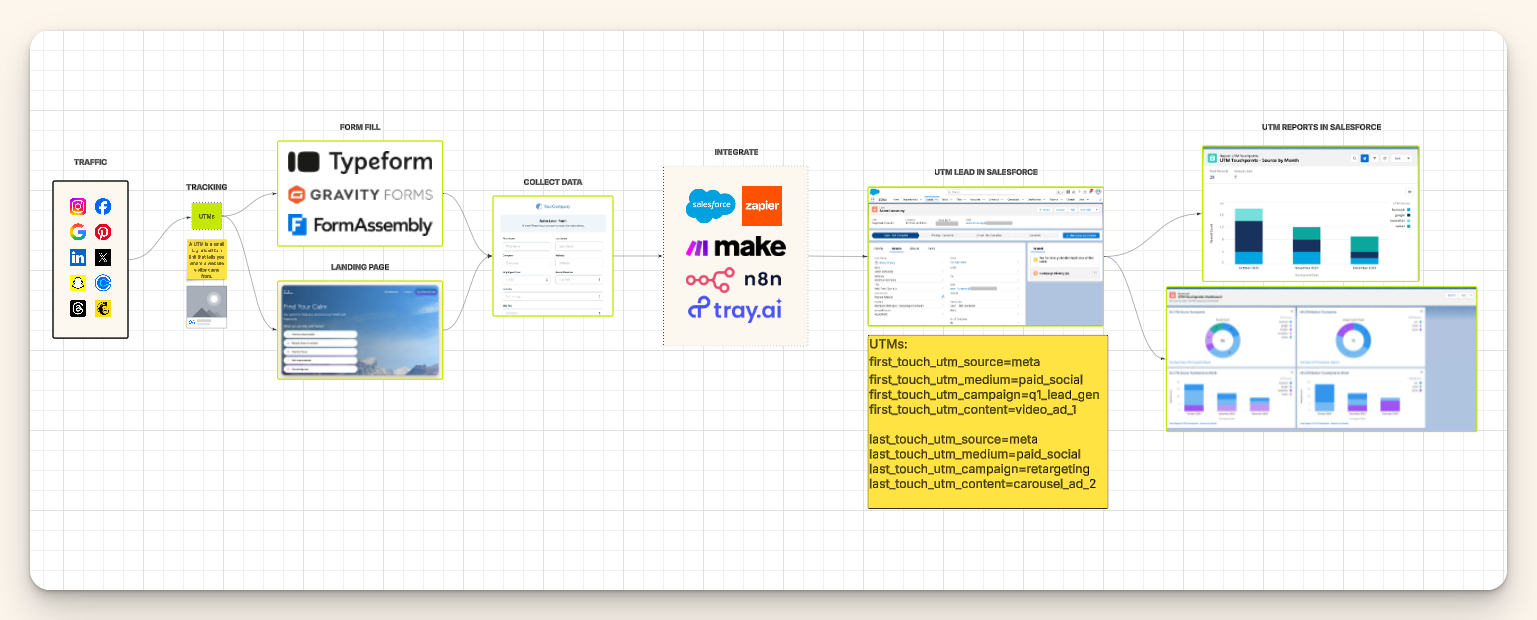
The exact flow from traffic to Salesforce
How to store UTMs on leads the right way
Why first touch and last touch matter
The reports and dashboards to build once it is live
What is a UTM?
A UTM is a small set of tags added to a URL so you can track where a visitor came from.
Example UTM fields you will see most often:
utm_source (where they came from, like facebook, linkedin, google)
utm_medium (the type of channel, like paid_social, cpc, email)
utm_campaign (your internal campaign name, like q1_lead_gen)
utm_content (the creative or variant, like video_ad_1)
When someone clicks a tagged link, those UTMs travel with them into your website session. If they fill out a form, you can capture those UTM values and pass them into Salesforce on the lead record.
That is the whole game: carry attribution from the click into the CRM.
Why MarketingOps teams implement this system
This setup supports three business outcomes that MarketingOps is often measured on:
1) Faster decisions
Without clean attribution, teams argue about numbers across:
ad platforms
spreadsheets
analytics tools
Salesforce
sometimes HubSpot plus Salesforce
When UTMs land in Salesforce consistently, you can build one set of reports that everyone trusts. Less debate. More execution.
2) Reliable growth
If you cannot answer “where do our leads come from,” you cannot turn growth into a repeatable formula.
The goal is to get to a place where you can say:
When we spend X, we can predict Y leads and Z pipeline.
It is hard to get there without reliable source tracking.
3) Smarter spend
When you know which channels produce leads that convert, you stop wasting budget on the wrong places.
That frees money for the things companies always want to fund: hiring, raises, better tooling, infrastructure, and experiments that actually matter.
The full flow: from traffic to Salesforce
Here is the simple lifecycle:
Step 1: Traffic happens
Traffic comes from everywhere:
Google Ads
Meta ads
LinkedIn ads
newsletters
Calendly links
organic social
At this stage, platform reporting is mostly aggregated and often anonymized. You can see clicks and impressions, but you cannot reliably tie an individual person to a source inside your CRM.
Step 2: You de-anonymize the visitor with an exchange of value
To capture a lead, you give value in exchange for their info. Common options:
a lead magnet
a webinar signup
a free trial
a demo request
a newsletter
This happens via a form, either directly on the platform (like LinkedIn lead forms) or on your site (landing page with a form).
Step 3: UTMs capture the source
Your links must include UTMs so the visit can be attributed.
A large company example you can recognize is when you click an ad and the URL contains utm_source, utm_medium, and utm_campaign. That is the standard practice. Some companies make the URL look cleaner, but the concept is the same.
Step 4: The form captures UTMs and contact fields
The form should capture:
contact fields (name, email, company)
UTM fields (source, medium, campaign, content)
Important MarketingOps note: the more fields you ask for, the higher intent the lead usually is, but volume typically drops. Fewer fields increase volume, but you often get lower quality leads. Choose based on your funnel and sales motion.
Step 5: Send it to Salesforce and store it on the lead record
Once a form is submitted, the data must be mapped into Salesforce.
There are three common ways to do this.
How to get UTM data into Salesforce
Option 1: Salesforce Web-to-Lead (fastest and simplest)
Salesforce can generate an embedded form you place on your website. When someone submits it, Salesforce creates the lead automatically.
This is great when:
you have fewer landing pages
you do not need heavy testing across dozens of page variants
Option 2: Native integrations (best practice when available)
Before buying middleware, check whether your landing page tool or platform has a native Salesforce integration via AppExchange.
Common examples:
landing page builders
email tools
LinkedIn lead forms
Native connectors reduce failure points and usually require less maintenance.
Option 3: Middleware (Zapier, Make, Tray, etc.)
If you need flexibility, or you have many tools, middleware works well. The key is not the tool. The key is the mapping discipline.
MarketingOps rule: do not pass UTMs “somewhere.” Pass them into specific Salesforce fields with consistent naming and definitions.
How to store UTMs in Salesforce the right way
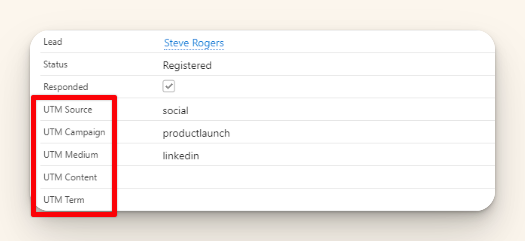
Once leads are in Salesforce, you want the UTM values stored in a clean, standardized way.
I recommend a dedicated section on the Lead page layout called:
Marketing Information
In that section, store:
UTM Source
UTM Medium
UTM Campaign
UTM Content
You can keep the fields hidden from most users if you want. The main point is that they exist and can be reported on reliably.
First touch vs last touch UTMs (and why you want both)
This is where MarketingOps teams become dangerous in a good way.
First touch UTMs
First touch means: the first time this person ever discovered you.
You capture it once and never overwrite it.
This answers:
What is working for cold traffic?
Which channels introduce net-new leads to your brand?
Last touch UTMs
Last touch means: the most recent marketing interaction before conversion.
This is useful for understanding:
what pushes hot leads over the line
which campaigns support late-stage conversion
what content drives validation (case studies, reviews, deeper pages)
MarketingOps takeaway: First touch helps you scale awareness and top of funnel. Last touch helps you understand conversion influence.
If you only track one, start with first touch. If you want a foundation that scales, implement both.
The reports that make this worth it
Once UTMs are consistently captured, you can build a single source of truth inside Salesforce.
Start with these:
Report 1: Leads by UTM Source (monthly trend)
This shows which sources drive lead volume and how it changes month over month.
Report 2: Leads by UTM Medium
Great for separating paid social vs email vs organic vs referral.
Report 3: Leads by Campaign and Content
This is where creative and campaign performance becomes obvious.
Next level: add pipeline and revenue
Once the sales cycle data is clean, you can connect UTMs to:
opportunities created
pipeline generated
closed won revenue
This is how MarketingOps turns attribution into budget leverage.
Common mistakes to avoid
Not standardizing UTM values Decide on a naming convention (facebook vs meta, paid_social vs paid-social) and enforce it.
Overwriting first touch First touch should be locked after it is set.
Capturing UTMs on some forms but not others You need consistent tracking across your key conversion points, especially demo requests and high-intent assets.
Treating UTMs like a marketing-only concern Sales benefits from this too. Better lead source means better prioritization and better conversations.
Final takeaway
If you want faster decisions, more reliable growth, and smarter spend, MarketingOps needs one thing:
A consistent way to track lead source from the click into Salesforce.
UTMs are the simplest, most proven way to do it. Set them up on your links, capture them on your forms, map them into Salesforce, and report from one place.
If you already have this partially implemented, the win is usually in tightening the standards, adding first touch and last touch, and making your Salesforce reporting actually usable.
Join the Simply Scale network and get insider strategies, automation tips, and expert insights straight to your inbox. No fluff—just real solutions to scale faster.

.png)
.png)


.png)
.png)
