RevOps
Pipeline hygiene rules that stop your AEs from gaming the number
Your AEs are gaming your pipeline and you can't see it. Here are the stage rules, close-date policies, and alerts that fix it in Salesforce.

April 27, 2026
.png)
Read Time: 3 Minutes
Short answer: AEs game Salesforce pipelines when stages, close dates, and required fields are unenforced. Fix it with 4 controls: stage entry gates via validation rules, a 90-day close-date rule with auto-flags, stage-gated required fields using before-save Flows, and 3 scheduled hygiene reports that email deal owners and managers weekly. Takes half a day to build.
Your pipeline is lying to you... and your AEs know it.
Most RevOps leaders spend Monday fixing forecast output. The problem is upstream.
Every Salesforce opportunity stage is just a label until you define what it takes to enter and exit.
Without criteria:
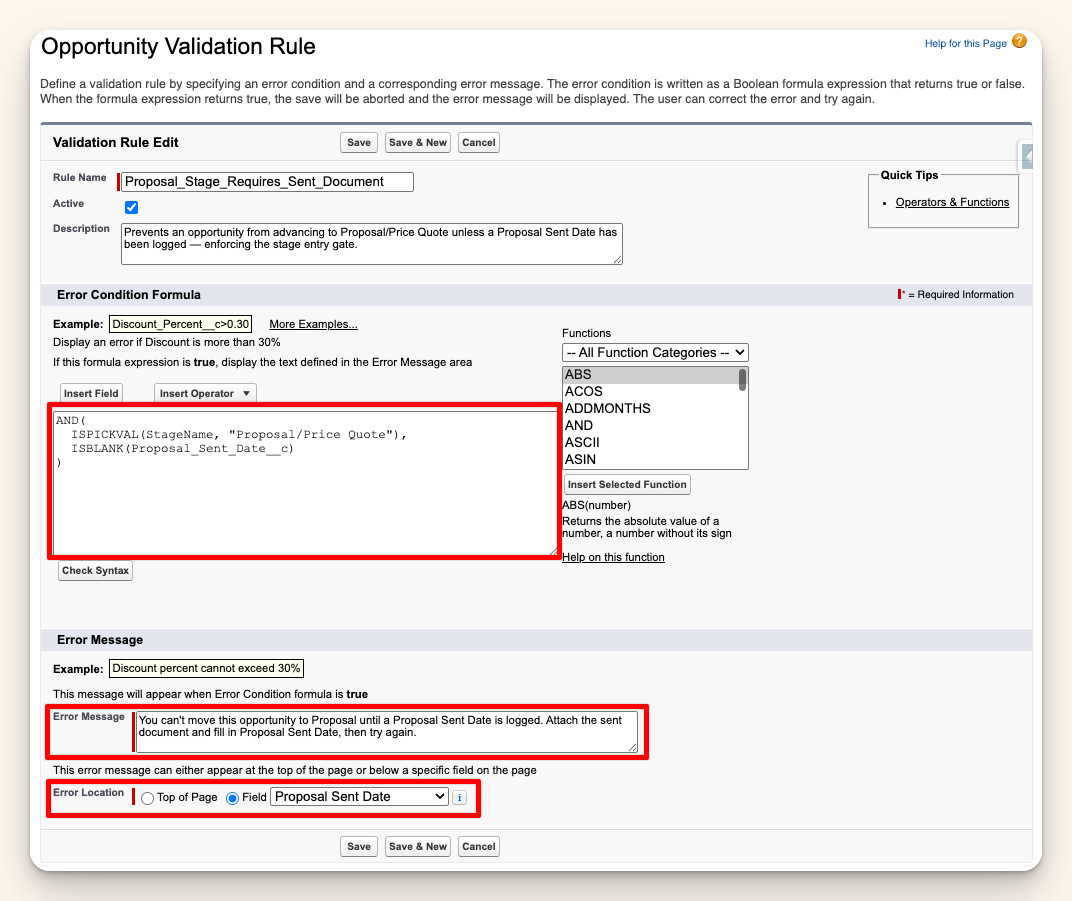
Fix it with stage entry gates:
These become validation rules in Salesforce. No advancing without proof.
Bad close-date hygiene looks like this: 47 deals with a close date of 12/31 every year.
It's not a pipeline. It's a parking lot.
Enforce 3 rules:
You can build the auto-flag with a scheduled Flow that stamps a "Stale Close Date" checkbox when conditions are met. Takes 20 minutes.
The mistake: making every field required on every stage.
The result: AEs type random data just to save the record.
The fix is stage-gated required fields using a before-save Record-Triggered Flow:
This raises the bar exactly when it matters... without making AEs fill out a 20-field form on day 1 of a new deal.
Test your rules in a sandbox before pushing to production. You want to see how they behave before your AEs do.
Don't wait for the pipeline review meeting to find bad data.
Build 3 scheduled reports that run automatically:
Email each report to the deal owner and their manager. No custom code.
These reports expose behavior patterns. If the same rep keeps pushing close dates without stage changes, that's a coaching conversation, not a data problem.
A healthy pipeline dashboard tracks 4 metrics every week:
If your dashboard doesn't have these... your pipeline review is running on vibes.
Monday morning: run 1 pipeline health report before your team call.
Count the deals with a past close date, no activity in 14 days, or a stage that hasn't moved in 30 days.
That number is your first priority. Not the review meeting with your CRO.
Pipeline hygiene is the set of rules and automation that keeps opportunity data accurate: enforced stage entry criteria, close-date discipline, required fields by stage, and scheduled alerts for stale or suspicious deals. Without it, pipeline reports reflect rep behavior more than actual sales reality.
Build a scheduled Flow that flags any deal whose close date has been pushed more than 90 days without a stage change, and any deal 30+ days past close date. Email both the AE and their manager. Review the flag list weekly, not quarterly.
No. Blanket required fields make AEs type garbage to save records. Use stage-gated required fields via before-save Record-Triggered Flows: require Next Step at Needs Analysis, Amount and Close Date at Proposal, Decision Maker at Negotiation. Raise the bar exactly when it matters.
4 metrics weekly: percentage of deals with a next step logged in the last 7 days, average age by stage, close-date push count in the last 30 days, and deals with no activity in 14 days by owner. Each surfaces a different failure mode.
Yes. Validation rules for stage entry gates, before-save Flows for stage-gated required fields, scheduled Flows for close-date auto-flags, and scheduled reports for weekly hygiene alerts can all be built declaratively. Apex is only needed for very high-volume orgs or complex cross-object rules.
Want more of this? The Simply Scale newsletter drops every week: https://www.gosimplyscale.com/newsletter
Jordan Nelson is the founder of Simply Scale, a Salesforce consultancy helping B2B tech companies scale from $3M to $100M in ARR. Over 10 years in RevOps and Salesforce architecture at HealthEquity, Podium, and Divvy/Bill.com. Trusted by operators at Overjet, Clicklease, Notable, and Blitz Insurance. Writes to 6,000+ ops leaders every week at gosimplyscale.com/newsletter.


Let's talk about how we can build a Salesforce system that grows with your business.
