Guide
Slack plus Salesforce integration patterns that teams actually use
Salesforce and Slack connect through 3 patterns your team will actually use: deal rooms, stage alerts, and record channels. Here's how to set each one up.

May 14, 2026
.png)
Read Time: 8 Minutes
Slack is open all day. Salesforce is closed whenever your reps feel like logging in.
Short answer: Salesforce and Slack work together through 3 proven patterns. Sales Cloud for Slack for deal-room alerts and instant record updates, Salesforce Flow automations that push stage-change notifications into deal channels, and record channel subscriptions that keep account teams informed without requiring reps to open a browser. Pick 1 pattern first, deploy it, and measure adoption before adding more.
Most teams install the Slack-Salesforce connection and never configure it past the defaults. Then it becomes another notification nobody reads.
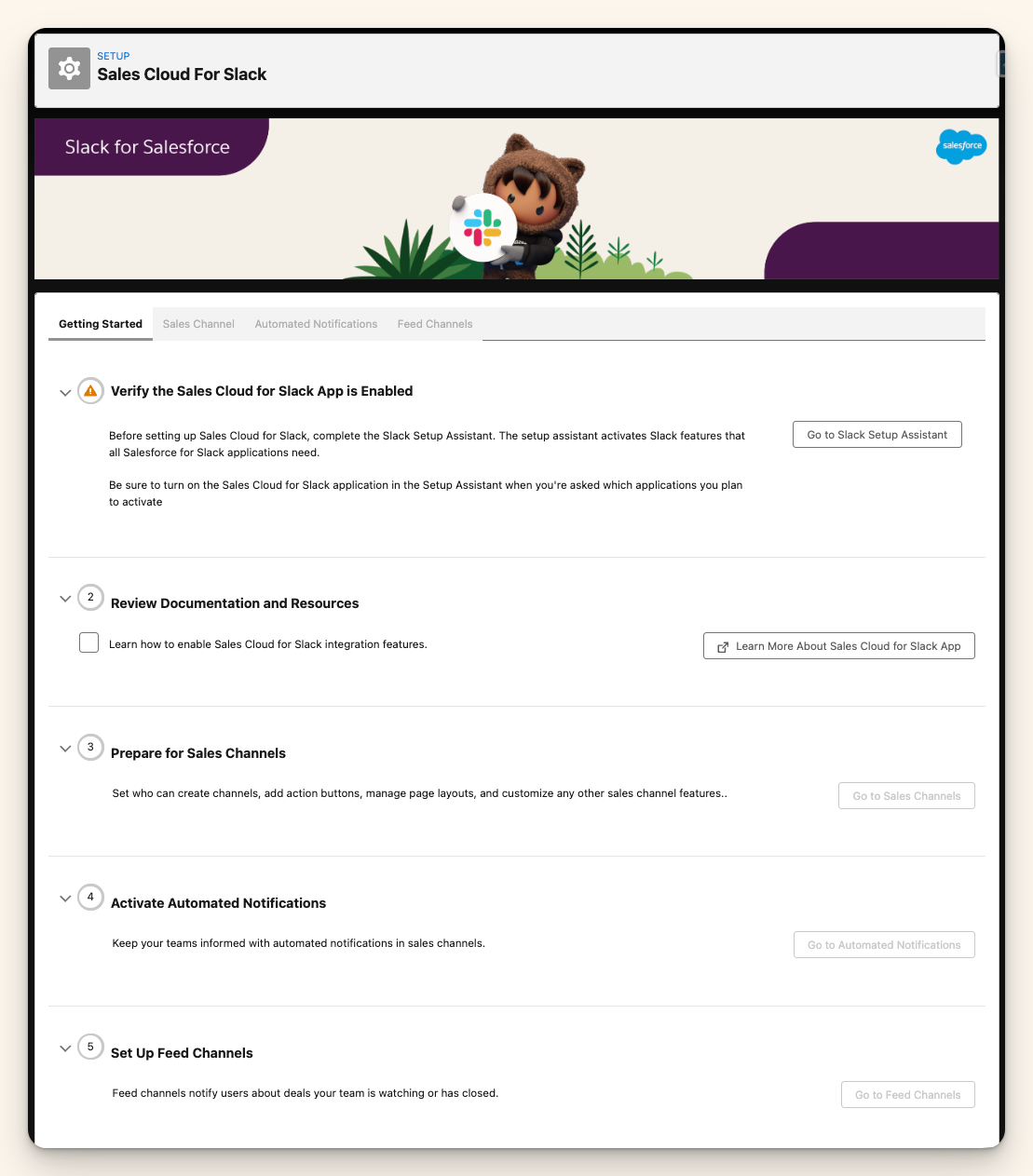
Sales Cloud for Slack is the native connector Salesforce ships with Sales Cloud Professional and above. No developer needed. No Zapier workaround.
Here is what it gives you out of the box:
Setup lives in Salesforce Setup, then Slack. Your Slack admin approves the connection once. After that, each rep authenticates their own account and the integration is live within minutes.
Most orgs skip this step and try to build something custom. That is a mistake. Start here. It handles 80% of the use cases that matter and requires zero code.
A deal room is a Slack channel tied to a specific Opportunity. Everything about that deal lives in the channel: call notes, objection handling, document review, manager coaching.
This is the pattern that works for B2B teams closing deals over 30+ days:
The benefit: everyone on the deal knows exactly where to find the current status, notes, and history. No more pinging the AE before forecast calls asking for an update.
One thing to get right up front: name the channels consistently. A naming convention like #deal-[account]-[quarter] makes it easy to find and archive after close.
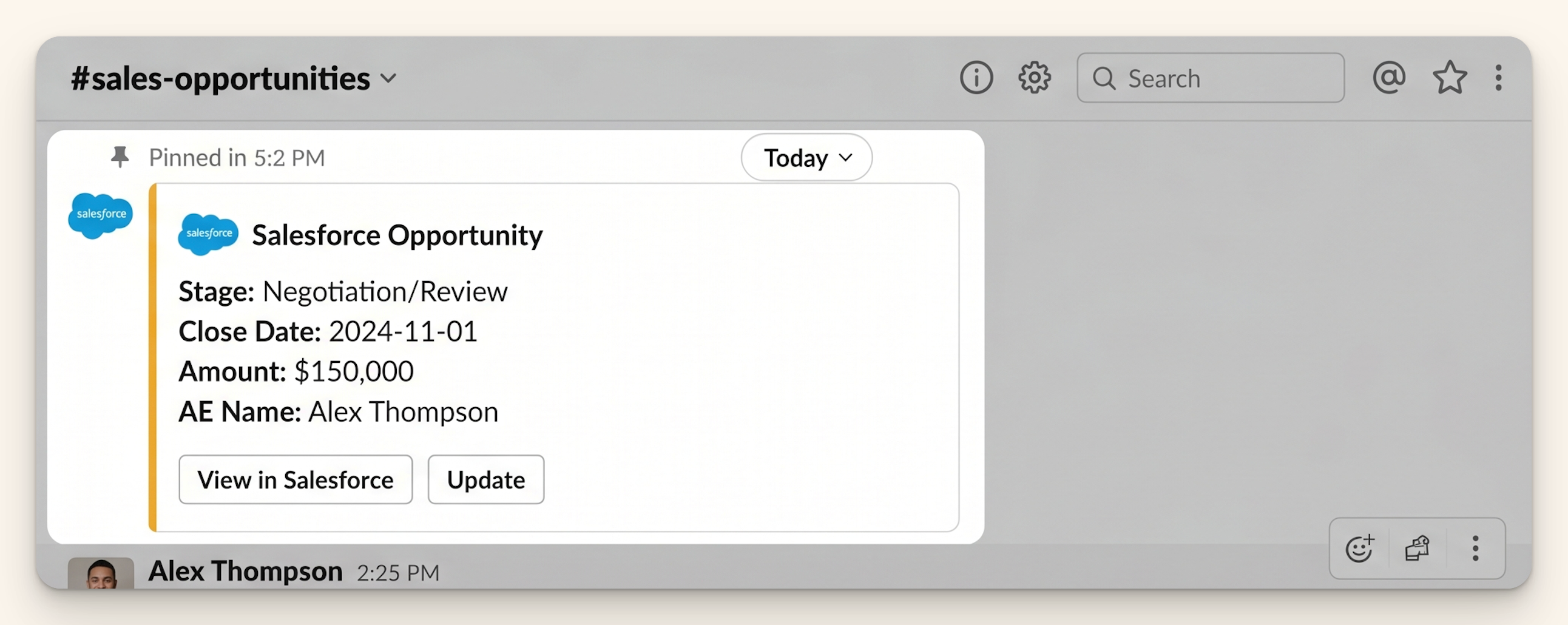
Stage-change notifications are the highest-value automation in this list. They take under 30 minutes to build and create immediate adoption because reps like seeing their progress celebrated publicly.
Build it with a Salesforce Flow:
Keep the message short. 3 seconds to read. The signal is the stage change. Everything else is noise.
If a deal moves to Closed Won, that message should go to your #revenue or #wins channel and everyone should see it. Public Closed Won alerts build team culture and they take 10 minutes to set up.
Deal rooms are for active pipeline. Record channels are for ongoing accounts.
Set up a Slack channel for each key account or customer segment. Subscribe your CS, AE, and account lead. Then use Flow automations to push relevant signals from Salesforce into the channel:
The goal is to eliminate the Monday morning question: what is the latest with this account? Your team should already know because the channel told them 3 days ago.
Do not try to push every event. Start with the 2 signals that matter most for your retention motion. Add more once the team is actually reading the channel.
Most Slack-Salesforce integrations die within 60 days. Not because the technology fails, but because the team starts ignoring 40 daily notifications.
3 alerts that drive adoption:
3 alerts that kill adoption:
The rule is simple: every Slack notification should require or celebrate an action. If it is purely informational with no clear next step, put it in a Salesforce report instead. Reports are for information. Slack is for action.
Start with Sales Cloud for Slack and connect your existing licenses before building anything custom. Your first automation should be Closed Won alerts in a shared team channel. Your second should be stage-change notifications for pipeline in motion.
Add deal rooms for your top 10 active deals. Measure for 2 weeks. Is the team using the channels? Are reps updating Salesforce directly from Slack? If yes, expand. If no, find out why before you build more.
Integration adoption fails when you build too much too fast. Pick 1 pattern. Deploy it. Prove it works. Then add the next one.
Sales Cloud for Slack is a native Salesforce-built connector that runs inside your Salesforce org and your Slack workspace without a third-party intermediary. It supports Opportunity record previews, field updates from Slack, and built-in Flow actions. Zapier is a general-purpose automation tool that can connect the two platforms but adds a middleware layer, an additional cost, and a potential sync delay. For standard Sales Cloud use cases, the native connector is the right starting point.
Yes. Sales Cloud for Slack requires Slack Pro or above on the Slack side, and Sales Cloud Professional or above on the Salesforce side. If your team is on Slack Free, you will hit limits on message history and third-party app integrations that will break the experience. Slack Pro costs around $7.25 per user per month, which is well below the cost of the time your team wastes switching between tabs.
Yes. With Sales Cloud for Slack, reps can update Opportunity Stage, Amount, and Close Date directly from a Slack record preview card. The update writes to Salesforce in real time. This is the primary productivity benefit of the native integration: reps who live in Slack all day can update Salesforce without context-switching, which means your data is more likely to be current when you run your pipeline review.
The fix is to audit your active Flows and notifications before connecting Slack. List every notification that currently fires in Salesforce. For each one, decide: does this need to reach the team in real time, or can it live in a report? Move informational-only alerts to scheduled reports. Keep only the real-time action signals in Slack. A good starting set is 3 to 5 notification types maximum, reviewed every 90 days and trimmed as adoption patterns become clear.
Yes. Salesforce Flow has a native Send Slack Message action available once you have Sales Cloud for Slack connected. This means you can trigger Slack messages from any record-triggered, scheduled, or platform event Flow in your org. You can route messages to specific channels, include dynamic field values from the triggering record, and target individual Slack users by their Salesforce user record. No custom Apex or API call required.
Want more of this? The Simply Scale newsletter drops every week: https://www.gosimplyscale.com/newsletter
Let's talk about how we can build a Salesforce system that grows with your business.
.png)
.png)
.png)
