RevOps
Stop your Salesforce forecast from lying to you every Monday
Your Salesforce forecast is wrong right now. Here's how to fix forecast categories, collaborative forecasting, and override discipline in Sales Cloud.

April 27, 2026
.png)
Read Time: 3 Minutes
Short answer: Salesforce forecasts drift because forecast categories mean different things to different managers, manager overrides happen without rules, and Collaborative Forecasting is either off or misconfigured. Fix it in 4 moves: enable Collaborative Forecasting in Setup, define the 5 categories precisely, lock overrides behind a notes-required policy, and run a monthly Commit-that-didn't-close audit report.
Your Salesforce forecast is wrong right now... and your reps know it.
Most sales teams treat the weekly forecast call like a negotiation. The rep defends their number. The manager pushes back. A new number appears. None of it reflects reality.
That gap costs CROs their credibility and ops teams their weekends.
Most Salesforce forecasts fail before the rep opens the opportunity record.
3 root causes:
If "Commit" means 3 different things to your 3 sales managers, you don't have a forecast.
You have a collection of guesses with a dollar sign on top.
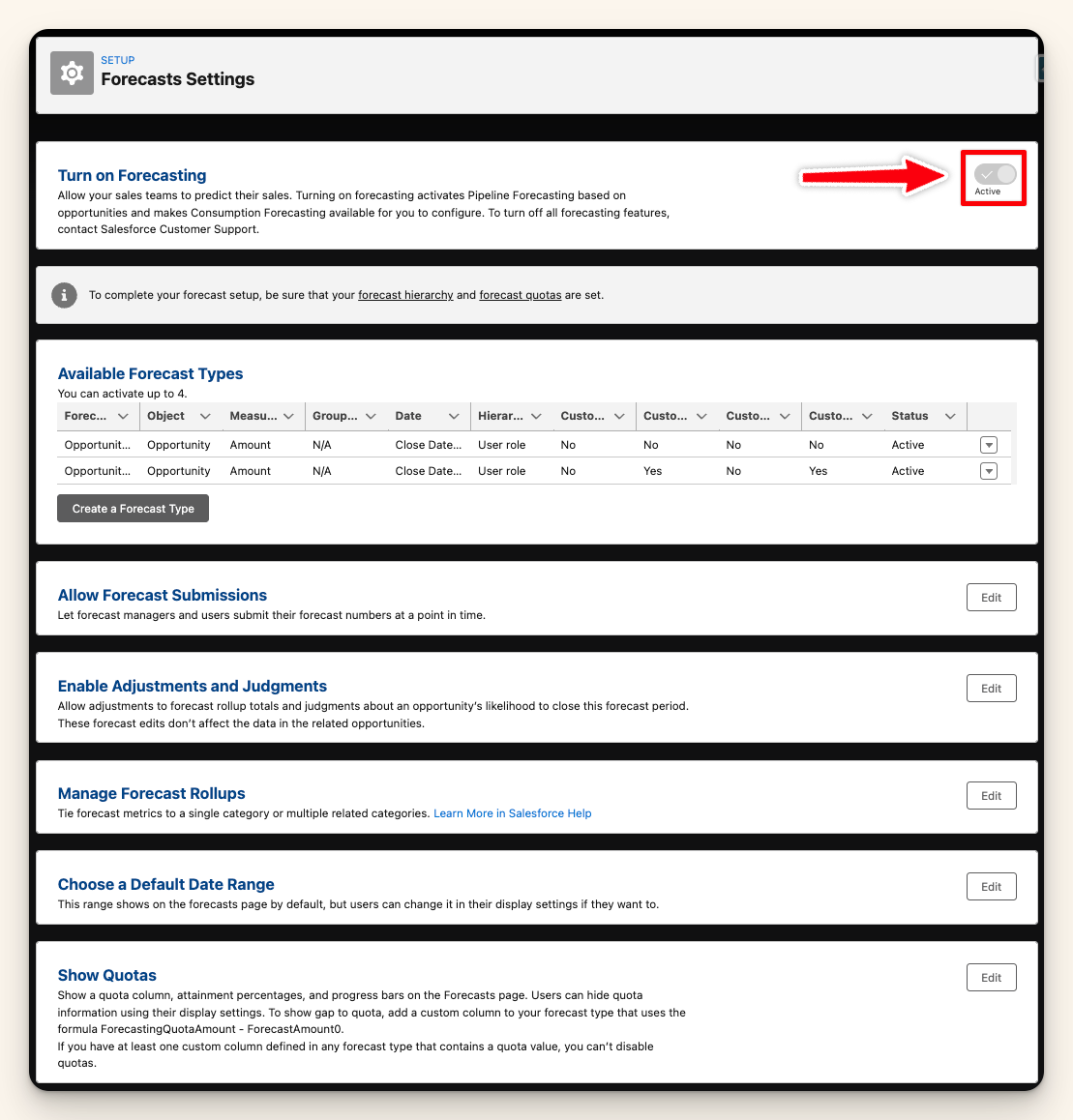
Collaborative Forecasting ships with Sales Cloud. Most orgs have it turned off by default.
Here's what to configure:
Once it's live, managers can see their team's rollup and submit their own adjusted number.
That separation between the rep view and the manager view is where accuracy lives.
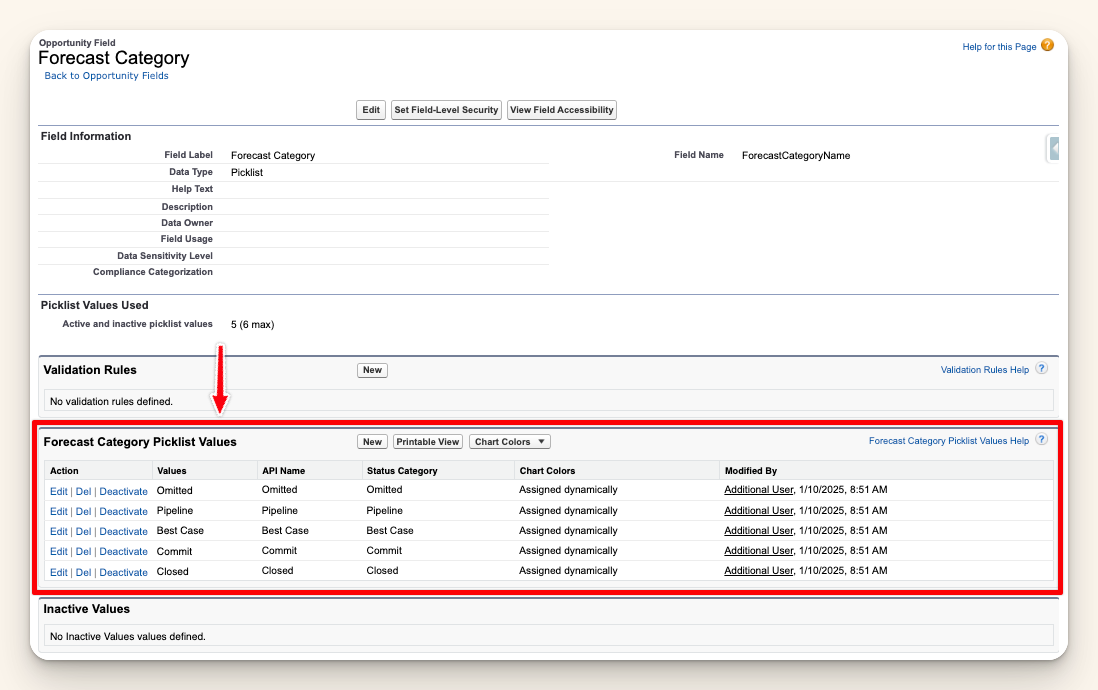
Salesforce ships with 5 default forecast categories: Pipeline, Best Case, Commit, Omitted, Closed.
Your job is to make each one mean exactly 1 thing across every rep and manager.
The definition set that works:
Write these down. Put them in your sales playbook. Reference them every Monday before the call.
Manager overrides are one of the most powerful and most abused features in Collaborative Forecasting.
Without a policy:
With a policy:
That delta tells you more than the number itself. Managers overriding up consistently means reps are sandbagging. Overriding down means your stage exit criteria are broken.
Pull a report once a month: every Commit opportunity that didn't close.
Filter: Stage not equal to Closed Won, Forecast Category = Commit, Close Date in the last 30 days.
Look for these 3 patterns:
That report tells you whether your Commit category actually means anything.
A lying forecast is not a Salesforce problem. It is a definitions and discipline problem.
Enable Collaborative Forecasting. Define your categories. Add an override policy. Run the monthly audit report.
Do those 4 things and your Monday call becomes a real number, not a weekly negotiation.
The 3 most common root causes are: forecast categories mean different things to different managers, manager overrides happen without documented rationale, and Collaborative Forecasting is either turned off or misconfigured. Fix those 3 and accuracy typically improves within a single quarter.
Yes. Collaborative Forecasting is included in Sales Cloud Enterprise and above at no extra cost. It ships off by default and requires an admin to enable it in Setup under Forecasts Settings. Most orgs can have it live in under an hour.
Opportunity stage is the sales process step (Discovery, Proposal, Negotiation). Forecast category is how Salesforce rolls that stage into the forecast (Pipeline, Best Case, Commit, Omitted, Closed). Each stage maps to exactly 1 category, and you control the mapping.
Monthly is the minimum. Pull every Commit opportunity that did not close in the last 30 days, filter by Stage not equal to Closed Won, and look for slipped-commit patterns by rep. Weekly is better if your sales cycle is under 60 days.
Only with a documented policy. Every override should require a rationale in a notes field, adjust only 1 level up in the hierarchy, and get reviewed weekly. Overrides without policy destroy trust between reps and managers and wreck forecast credibility.
Want more of this? The Simply Scale newsletter drops every week: https://www.gosimplyscale.com/newsletter
Jordan Nelson is the founder of Simply Scale, a Salesforce consultancy helping B2B tech companies scale from $3M to $100M in ARR. Over 10 years in RevOps and Salesforce architecture at HealthEquity, Podium, and Divvy/Bill.com. Trusted by operators at Overjet, Clicklease, Notable, and Blitz Insurance. Writes to 6,000+ ops leaders every week at gosimplyscale.com/newsletter.



Let's talk about how we can build a Salesforce system that grows with your business.
